DataOps Training: Build Practical Skills for Modern Data Operations
Introduction
Imagine a company where thousands of pieces of information arrive every minute. Customer orders, website activity, payments, product details, and reports all create new data. But data is useful only when people can trust it and access it at the right time. This is why modern data teams need more than databases and coding skills. They also need reliable ways to test, automate, monitor, and manage data workflows. DataOps brings these activities together. DataOps Training helps learners understand how modern data systems work from start to finish. Instead of looking at data as a single task, it teaches how different teams and technologies can work together to create dependable data processes.
What Does DataOps Actually Do?
DataOps is a set of practices that helps teams manage the movement and delivery of data.
Think about delivering packages. A package starts at one location, travels through several steps, and finally reaches the customer. If the address is wrong, the package is delayed, or the tracking system fails, the whole process becomes difficult.
Data pipelines work in a similar way. Data moves through different systems before reaching an analyst, application, dashboard, or business user.
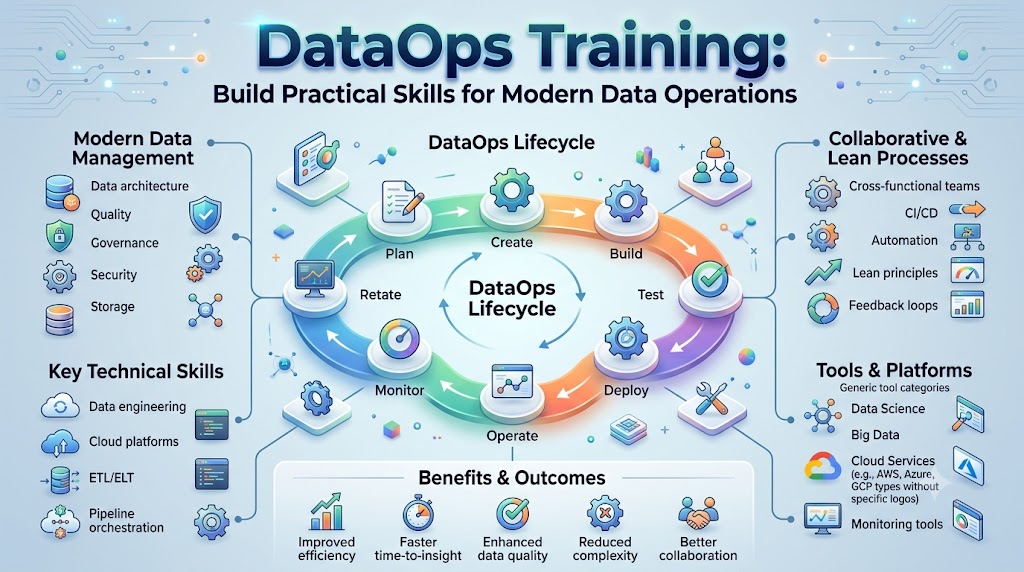
DataOps helps teams improve this journey through:
- Automation
- Testing
- Monitoring
- Collaboration
- Version control
- Data quality checks
- Continuous improvement
The focus is not simply on moving more data. It is about creating workflows that teams can understand, test, observe, and maintain.
Why DataOps Has Become Important
Modern organizations depend on data for reporting, analytics, applications, machine learning, and business decisions. As the amount of data grows, manually managing every process becomes harder.
A small problem can also affect many downstream systems.
For example, imagine that a source application changes the name of a database column. A data pipeline that expects the old name may fail. A report depending on that pipeline may then show incomplete information.
DataOps encourages teams to build checks around their workflows. These checks can help identify problems earlier and make troubleshooting more organized.
Collaboration Between Teams
Data work often involves several groups.
Data engineers may build pipelines. Analysts may use the results. DevOps or platform teams may manage infrastructure. Business teams may define what information they need.
Without communication, each group may understand only one part of the process.
DataOps encourages these teams to work together and share responsibility for reliable data delivery.
The Role of Data Pipelines
A data pipeline moves information through a series of steps.
A basic workflow might collect data from an application, clean it, validate it, transform it, store it, and make it available for analysis.
For example, an online store may collect:
- Customer information
- Product details
- Order records
- Payment information
- Website activity
This information may come from different systems and formats. A pipeline helps bring it into a useful structure.
Common Pipeline Stages
A modern pipeline can include several stages:
- Ingestion: Data enters the system.
- Validation: The system checks whether the data follows expected rules.
- Transformation: Data is cleaned or converted into a useful format.
- Storage: Processed information is stored.
- Testing: Automated checks look for problems.
- Monitoring: Teams watch pipeline health.
- Delivery: Trusted data reaches applications, reports, or users.
DataOps helps teams manage these stages as part of one connected workflow.
Automation Makes Data Work Easier to Manage
Imagine having to manually start 100 data tasks every morning. It would take time, and one missed task could affect the entire workflow.
Automation allows systems to perform repeatable tasks without requiring someone to start each one manually.
For example, a workflow can be scheduled to collect data every morning, validate it, transform it, and prepare it for reporting.
However, automation does not mean that people are no longer needed. Teams still need to design workflows, review results, handle unexpected problems, and improve the system.
Understanding Orchestration
Orchestration is about organizing tasks and controlling the order in which they run.
Apache Airflow is commonly used for workflow orchestration. It allows teams to define workflows, schedule tasks, and monitor their execution.
For a beginner, it can be helpful to think of orchestration as a traffic controller. It helps different tasks happen in the correct order instead of allowing everything to run randomly.
Data Testing Helps Catch Problems
Testing is not only for software applications. Data pipelines also need testing.
Suppose a pipeline expects every order to have an order ID. If thousands of records suddenly arrive without order IDs, something may have changed.
A data test can check for this condition and report the problem.
Common data checks include:
- Missing values
- Duplicate records
- Invalid formats
- Unexpected values
- Broken relationships
- Incorrect record counts
- Schema changes
Testing can happen at different stages of a pipeline. This helps teams identify where an issue appeared instead of discovering it much later.
Data Observability Helps Teams Understand Problems
Monitoring tells teams whether something is working. Data observability helps them understand the health and behavior of data systems.
For example, a company normally receives a large number of transactions every day. One morning, the number suddenly drops.
That change could mean many things. Maybe the source system has stopped sending information. Maybe a pipeline failed. Maybe the data format changed.
Observability practices can help teams investigate these changes.
Teams may pay attention to:
- Data freshness
- Pipeline failures
- Data volume
- Schema changes
- Processing delays
- Quality problems
- Unexpected patterns
This makes data observability an important part of modern data operations.
DataOps and CI/CD
CI/CD stands for Continuous Integration and Continuous Delivery or Continuous Deployment.
These practices help teams manage changes in a controlled way.
Suppose a data engineer changes a transformation script. Sending that change directly into production could create unexpected results.
A CI/CD process can run automated checks before the change is delivered.
A workflow may include:
- Developer changes code.
- Code is stored in version control.
- Automated tests run.
- Problems are reported.
- Approved changes move forward.
- The updated workflow is monitored.
This approach connects development practices with data operations.
A Simple Real-World DataOps Example
Consider a food delivery company.
Customers place orders through an application. The system collects information about restaurants, customers, delivery locations, orders, and payments.
That information must move through different systems.
A DataOps approach could look like this:
- Order data is collected from the application.
- The pipeline validates important fields.
- Data is transformed into a common format.
- Automated tests check the results.
- Valid data is stored for analysis.
- Monitoring checks pipeline activity.
- Analysts use the processed data for reports.
If the application suddenly sends incomplete order information, automated validation may detect the issue.
This example shows why DataOps is not just about one technology. It is about managing the complete data workflow.
Common Challenges in DataOps
Learning and implementing DataOps can involve several challenges.
Managing Many Technologies
Data environments can contain databases, cloud services, orchestration tools, processing frameworks, monitoring systems, and analytics platforms.
Trying to learn all of them at once can make the subject confusing.
Start with the basic workflow first, then learn the tools that support each stage.
Understanding Data Dependencies
One pipeline may depend on another pipeline. A small change in one system can affect several downstream processes.
Understanding these dependencies is important for troubleshooting and planning changes.
Maintaining Data Quality
Data can change over time. New sources may be added, fields may change, and users may have new requirements.
Data quality checks need to evolve with the system.
Balancing Automation and Human Review
Automation is useful for repeatable tasks, but people still need to review important changes and investigate unusual results.
Good DataOps practices combine automation with human decision-making.
How to Start Learning DataOps
A structured learning path can make DataOps easier for beginners.
Step 1: Learn Data Basics
Start with databases, SQL, files, APIs, and basic data structures.
Step 2: Understand Pipelines
Learn how data is collected, transformed, stored, and delivered.
Step 3: Practice Python
Python is commonly used for data processing, automation, and scripting.
Step 4: Learn Orchestration
Explore how workflow tools organize and schedule data tasks.
Step 5: Study Data Testing
Practice checking data for missing values, duplicates, incorrect formats, and unexpected changes.
Step 6: Learn Monitoring
Understand how teams monitor pipeline health, data freshness, failures, and unusual behavior.
Step 7: Explore CI/CD
Learn how version control, automated testing, and deployment practices can support data workflows.
Step 8: Build Small Projects
Create simple pipelines and gradually add validation, automation, monitoring, and documentation.
TheDataOps.org can support this learning process by providing educational material around DataOps concepts, tools, data engineering practices, automation, and modern data operations.
DataOps Skills and Career Development
DataOps knowledge can support several technology careers.
Depending on the organization, professionals may work with responsibilities related to:
- Data engineering
- Pipeline development
- Cloud platforms
- Workflow automation
- Data quality
- Data observability
- CI/CD
- Infrastructure
- Monitoring
A DataOps Engineer may work across several of these areas. The exact role can vary between organizations.
For learners preparing for a DataOps Certification, it is useful to understand how concepts work in practice rather than focusing only on definitions.
Projects can also help learners connect different areas. Building a small pipeline, adding data tests, automating its execution, and monitoring its results can provide a clearer picture of how DataOps works.
FAQs
What is DataOps Training?
DataOps Training teaches learners how to manage modern data workflows using practices such as automation, testing, orchestration, monitoring, collaboration, and data quality management. Training may also cover tools and technologies used in data engineering environments.
Is DataOps difficult for beginners?
DataOps can seem broad because it connects several technical areas. Beginners can make it easier by learning the basics first, such as SQL, databases, Python, and data pipelines. After that, they can gradually explore orchestration, testing, monitoring, cloud technologies, and CI/CD.
What does a DataOps Engineer do?
A DataOps Engineer may build, automate, test, monitor, and maintain data workflows. Depending on the organization, the role may involve data pipelines, cloud infrastructure, orchestration, CI/CD, data quality, observability, and collaboration with other technical teams.
What tools are commonly used in DataOps?
Different organizations use different tools. Apache Airflow can support workflow orchestration, Kafka can support event streaming, Spark can support large-scale processing, Jenkins can support automation, Kubernetes can manage containers, and Grafana can support monitoring and visualization.
How does DataOps improve data quality?
DataOps encourages teams to place validation and testing into data workflows. Automated checks can identify missing, duplicate, invalid, or unexpected information. This allows teams to detect data problems as part of the workflow instead of relying only on manual checks.
What should I learn before DataOps?
Basic knowledge of databases, SQL, Python, data pipelines, and software development concepts can provide a useful foundation. You do not need to master every related technology before starting. A gradual learning path can help you understand each part without becoming overwhelmed.
Final Thoughts
DataOps can be understood as a way of making data work more organized and dependable. It connects data pipelines with testing, automation, monitoring, collaboration, and quality management. For beginners, the subject becomes easier when it is learned step by step. Start by understanding how data moves. Then learn how to test it, automate it, monitor it, and handle problems. Tools such as Airflow, Kafka, Spark, Jenkins, Kubernetes, Grafana, and Python can support different parts of this process, but tools are only one part of DataOps. The bigger goal is to create data workflows that teams can understand, manage, and improve. With structured DataOps Training and hands-on practice, learners can build a stronger understanding of modern data operations. TheDataOps.org can be a useful educational resource for exploring these concepts and developing practical knowledge.